iWatch Repair in Bengaluru: 2026 Cost Guide, Common Faults, and How to Choose a Genuine Service Centre

If your Apple Watch, commonly called an iWatch, has a cracked display, swollen battery, stuck Digital Crown, or charging problem, the right repair can often save you the cost of buying a new watch. In Bengaluru, repair pricing mainly depends on the model, the damaged component, parts quality, and whether your device is still covered by Apple warranty or AppleCare+.
This guide explains typical iWatch repair costs in Bengaluru, the most common Apple Watch faults, repair-versus-replacement decisions, and a practical checklist for choosing a trustworthy service centre.
Quick answer: Most iWatch repairs in Bengaluru fall into three categories: battery and minor component repairs, display/back-glass repairs, and complex water-damage or board-level repairs. Battery, crown, band, and charging repairs are usually far cheaper than a new Apple Watch, while display and water-damage repairs vary widely by model.
Apple states that Apple Watch is water resistant rather than waterproof, and warns that damaged watches—such as those with cracked screens, visible liquid intrusion, or damaged cases—should not be used because they may cause injury. AppleCare+ also covers battery replacement at no additional charge when battery capacity falls below 80% of its original capacity.
iWatch Repair Cost in Bengaluru: 2026 Overview
The table below gives an indicative Bengaluru repair-cost framework. Your final quote should always be confirmed after a model-specific diagnosis.
|
Repair type |
What it includes |
Indicative Bengaluru price range |
Typical turnaround |
|
Battery replacement |
Battery, adhesive/seal work, testing |
₹2,500–₹6,500 |
Same day–48 hours |
|
Screen/display replacement |
Cracked glass, dead pixels, touch failure, display lines |
₹3,000–₹20,000+ |
1–3 days |
|
Back glass/sensor housing |
Rear cover, charging contacts, heart-rate sensor area |
₹2,500–₹8,000 |
1–2 days |
|
Digital Crown repair |
Stuck crown, crown not rotating, crown sensor issue |
₹2,000–₹5,000 |
1–3 days |
|
Charging issue repair |
Charging puck testing, charging port/circuit diagnosis |
₹800–₹4,000 |
Same day–2 days |
|
Button/side-button repair |
Unresponsive or jammed button |
₹1,500–₹4,000 |
1–3 days |
|
Band replacement |
Strap, adapter, buckle, or band mechanism |
₹500–₹4,000+ |
Same day |
|
Water-damage treatment |
Cleaning, corrosion treatment, component-level diagnosis |
Diagnosis-based |
2–5 days |
|
Software/freeze issue |
Restart, restore, update, sensor recalibration |
Often free–₹1,000 |
Same day |
These ranges are market estimates, not fixed prices. Apple Authorised Service Providers determine their own service fees, and Apple says the final service fee is determined after inspection of the device.
Why iWatch Repair Costs Vary
Many customers expect one fixed price for “iWatch repair,” but Apple Watch repairs are model-specific. A battery replacement for an older Apple Watch SE is not priced the same as a display replacement for an Apple Watch Ultra.
The biggest cost factors are:
- Model and generation: Newer Series models and Ultra watches generally use costlier displays, sensors, and rear assemblies.
- Type of damage: A battery replacement is usually simpler than display or water-damage repair.
- Part grade: Genuine, OEM-grade, and aftermarket parts have different price and reliability levels.
- Extent of damage: A cracked screen may also involve touch-layer, sensor, or frame damage.
- Water exposure: Liquid damage can affect several components at once, so the final cost is known only after inspection.
- Warranty status: Apple warranty or AppleCare+ may reduce or eliminate the cost for eligible repairs. AppleCare+ covers battery replacement when capacity drops below 80%.
iWatch Repair Cost by Model
Apple Watch SE
The Apple Watch SE is usually among the more affordable models to repair because it has a simpler hardware configuration than higher-end Series or Ultra watches.
Common SE repairs include:
- Battery replacement after reduced backup or sudden shutdowns
- Screen replacement after drops or pressure damage
- Charging issues caused by a faulty puck, cable, or charging circuit
- Band and adapter replacement
For SE models, battery and minor component repairs are often cost-effective. Display replacement can still be expensive because the display assembly is a major component.
Apple Watch Series 4 to Series 8
These models are widely used in Bengaluru, so parts availability is generally better than for very old watches. Common faults include battery ageing, cracked displays, back-glass damage, and Digital Crown problems.
For this group, repair is often worthwhile when the fault is limited to one component. However, if the watch has a damaged display plus water ingress, repair costs can rise quickly.
Apple Watch Series 9 and Series 10
Newer Series watches have better displays and more advanced sensors, which can make display and back-glass repairs more expensive. Battery replacement remains a common service need after 2–3 years of daily charging cycles.
If your Series 9 or Series 10 watch is under AppleCare+, check eligibility before paying for an out-of-warranty repair. AppleCare+ can reduce repair costs for accidental damage and includes battery coverage when capacity is below 80%.
Apple Watch Ultra and Ultra 2
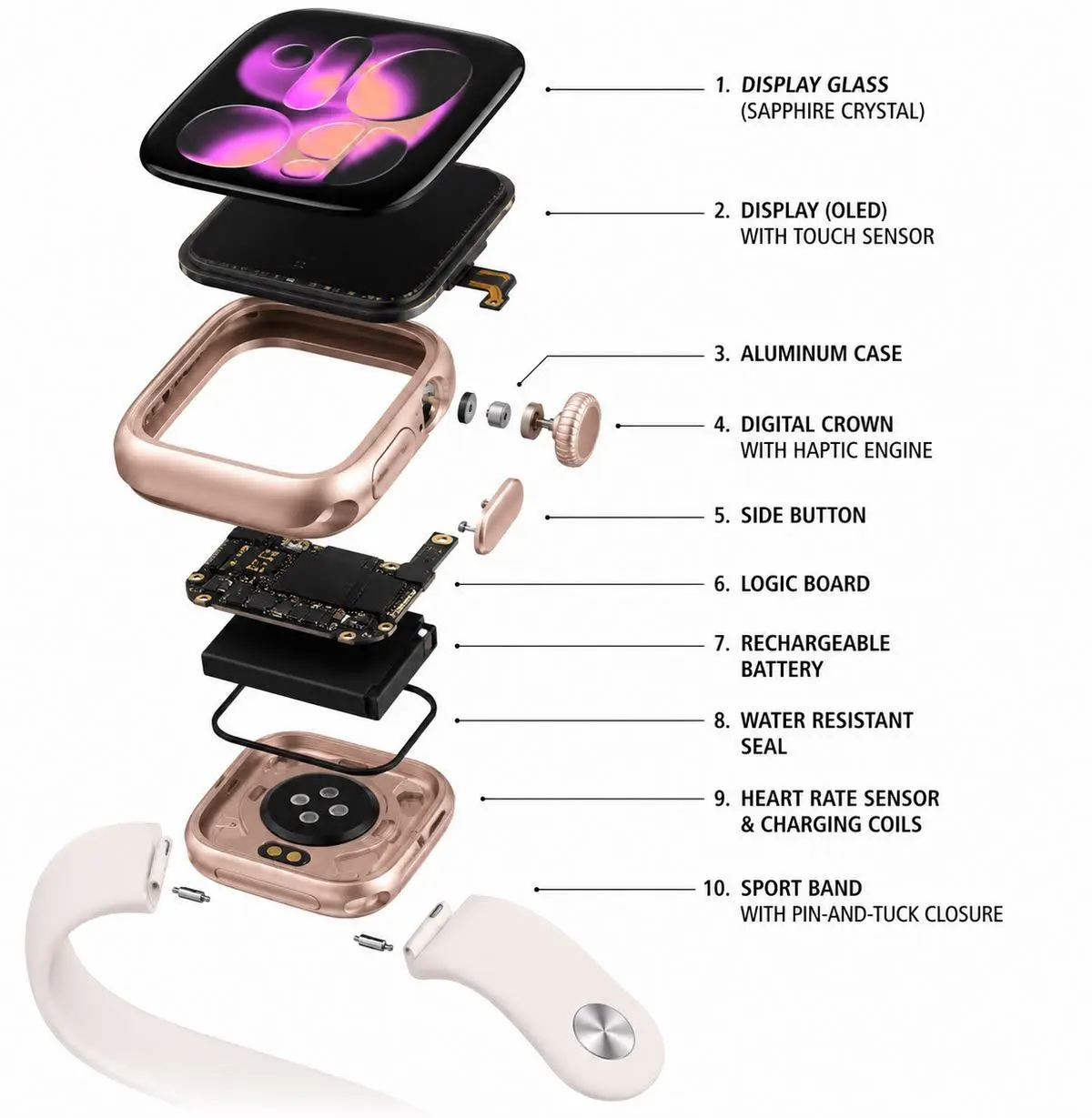
Ultra models are premium devices with rugged titanium cases, larger displays, and specialised hardware. Repairs can be more expensive because the display, case, and rear sensor assembly are built differently from standard Apple Watch models.
For Ultra owners, a professional diagnosis is especially important before approving a repair. A minor-looking crack may affect the display assembly, sensor alignment, or water-resistance seals.
Most Common iWatch Faults in Bengaluru

1. Cracked screen or display damage
This is one of the most common Apple Watch issues, especially after gym use, bike rides, accidental drops, or pressure while packed in a bag.
Symptoms include:
- Visible cracks or chips
- Black patches or display lines
- Touch not responding
- Ghost touches
- Display flickering
- Screen lifting from the frame
A cracked Apple Watch should not be ignored. Apple specifically cautions users not to use a damaged Apple Watch with a cracked screen or case, as it may cause injury.
Repair advice: Do not attempt DIY glass replacement. Apple Watch displays are integrated assemblies, and improper opening can damage the battery, sensors, or water-resistance seals.
2. Battery draining quickly
Battery drain is normal over time, but sudden drainage can indicate battery ageing, software issues, excessive background activity, or a faulty battery.
Common signs include:
- Battery dropping from 80% to 20% within hours
- Watch shutting down despite showing charge
- Watch becoming warm while charging
- Battery swelling or screen lifting
- Watch requiring multiple charges per day
A battery replacement is usually one of the most cost-effective repairs. If your AppleCare+ plan is active and battery health is below 80%, Apple says the replacement is covered without an additional fee.
3. Apple Watch not turning on
A dead Apple Watch does not always mean a dead battery. The issue may be a frozen watchOS process, charging accessory fault, battery failure, or a board-level problem.
Try these safe checks first:
- Charge the watch for at least 30 minutes using a known-good Apple charger.
- Force restarts the watch using the correct button combination for your model.
- Try a different charging cable and power adapter.
- Check whether the charging puck and back of the watch are clean and dry.
If the watch still does not power on, professional diagnosis is needed. Avoid opening the device yourself; Apple warns against DIY repair because it can damage the watch and affect water resistance.
4. Digital Crown stuck or not working
The Digital Crown can become stiff due to dust, sweat, lotion, or moisture. In some cases, the issue is mechanical; in others, it relates to the crown sensor or internal flex connection.
Symptoms include:
- Crown does not rotate smoothly
- Crown does not respond when pressed
- Screen does not return to the watch face
- Crown feels gritty or jammed
Do not use sharp objects, pins, or excessive force. A technician can clean, test, and repair the crown assembly safely.
5. Apple Watch not charging
Charging problems may come from the watch, charging puck, cable, adapter, or power source.
Check:
- Clean the back of the watch and charging puck gently.
- Use an original or certified charger.
- Try another wall adapter and socket.
- Look for debris, moisture, or corrosion on charging contacts.
If the watch charges intermittently or becomes hot, stop using it and get it inspected.
6. Water damage
Apple Watch models are water resistant, but not waterproof. Apple notes that water resistance can diminish over time and cannot be permanently guaranteed after service.
If your iWatch has been exposed to pool water, rain, sweat, soap, perfume, or high-pressure water:
- Remove it from the charger.
- Do not press buttons repeatedly.
- Do not use a hair dryer, oven, rice, or compressed air.
- Wipe it dry with a soft cloth.
- Take it for professional inspection as soon as possible.
Water damage can cause delayed corrosion, so a watch that appears fine today may fail days later.
Repair or Replace Your iWatch?
Use this table to decide whether repair makes financial sense.
|
Situation |
Recommended action |
Why |
|
Battery drains quickly |
Repair |
Usually far cheaper than buying a new watch |
|
Cracked screen but watch works |
Repair after quote |
Display repair can restore full usability |
|
Back glass cracked |
Repair after inspection |
Prevents further moisture and sensor issues |
|
Water entered the watch |
Immediate diagnosis |
Corrosion can spread if delayed |
|
Crown stuck but display works |
Repair |
Often a contained mechanical or sensor issue |
|
Logic board severely damaged |
Evaluate replacement |
Repair cost may approach replacement value |
|
Multiple major faults |
Compare repair quote with replacement |
Two or more costly repairs may not be economical |
|
Watch is very old with poor battery and screen damage |
Consider replacement |
Age, parts availability, and total repair cost matter |
A simple rule: if the repair restores reliable daily use and costs meaningfully less than a suitable replacement, repair is usually the better choice.
Genuine Parts vs Aftermarket Parts
Before approving an iWatch repair, ask exactly what kind of part will be used.
|
Part type |
What it means |
Best for |
Key consideration |
|
Genuine/OEM part |
Original or original-equivalent component |
Customers wanting maximum reliability |
Usually higher cost |
|
OEM-grade compatible part |
High-quality compatible component |
Budget-conscious repairs |
Quality varies by supplier |
|
Low-cost aftermarket part |
Generic replacement component |
Temporary or low-value repairs |
May affect display, battery, or durability |
For display and battery repairs, part quality matters most. A poor-quality battery can cause heating, poor backup, or inaccurate battery percentage. A low-grade display may have weaker brightness, poor touch response, or colour difference.
Always ask for:
- Written confirmation of part type
- Warranty period
- Whether labour is included
- Whether water-resistance sealing is included
- Post-repair testing details
How to Choose a Genuine iWatch Service Centre in Bengaluru
Choosing the right repair centre matters more than choosing the cheapest quote. Apple Watch repairs involve compact batteries, sealed assemblies, sensors, and delicate flex cables.
Use this 10-point checklist:
- Ask for a clear diagnosis first. A trustworthy centre identifies the fault before quoting.
- Request a written quotation. It should mention parts, labour, GST, and warranty.
- Confirm the exact part grade. Genuine, OEM-grade, and aftermarket are not the same.
- Check warranty terms. Look for coverage on both the part and workmanship.
- Ask about technician experience. Apple Watch repair requires specialised tools and handling.
- Check data privacy practices. Ask whether your watch data is accessed, backed up, or wiped.
- Look for transparent pricing. Avoid centres that refuse to explain the final bill.
- Check reviews and local presence. Verified reviews, a physical address, and clear contact details build trust.
- Ask about pickup and drop. This is useful if you cannot visit during working hours.
- Avoid unrealistic promises. No centre can guarantee original water resistance after every repair; ask exactly what assurance they provide.
Apple directs customers to Apple or an Apple Authorized Service Provider for repair, and warns against opening the device or attempting self-repair.
Our iWatch Repair Process
A professional service centre should follow a transparent process:
- Initial enquiry: Share the Apple Watch model, issue, and photos if possible.
- Diagnosis: The technician checks battery, display, crown, sensors, charging system, and moisture exposure.
- Written quote: You receive an exact price before repair begins.
- Approval: Repair starts only after you approve the quote.
- Repair: The technician uses appropriate tools, ESD-safe handling, and quality-checked parts.
- Testing: Display, touch, crown, sensors, charging, Bluetooth, calls, and workout tracking are tested.
- Warranty handover: You receive warranty details and aftercare instructions.
FAQs: iWatch Repair in Bengaluru
How much does iWatch repair cost in Bengaluru?
iWatch repair cost in Bengaluru depends on the Apple Watch model and the fault. Battery, crown, band, and charging repairs are usually less expensive, while display, back-glass, and water-damage repairs can cost more. A reliable service centre provides an exact quote only after diagnosis.
How much does Apple Watch screen repair cost in Bengaluru?
Apple Watch screen repair in Bengaluru can range from approximately ₹3,000 to ₹20,000 or more, depending on the model and whether the full display assembly must be replaced. Ultra and newer Series models generally cost more to repair than older SE models.
How much does an Apple Watch battery replacement cost in Bengaluru?
Battery replacement typically costs less than display repair, but the price varies by model and part quality. If your AppleCare+ plan is active and battery capacity is below 80%, Apple states that battery replacement is covered at no additional cost.
Can a cracked iWatch screen be repaired without replacing the watch?
Yes. In many cases, a cracked screen can be repaired by replacing the display assembly. However, the technician must check whether touch response, OLED display, sensors, and internal components are also damaged.
How long does iWatch repair take in Bengaluru?
Battery, band, and basic charging repairs may be completed the same day. Screen, back-glass, crown, and water-damage repairs can take one to five working days depending on diagnosis and parts availability.
Is iWatch water damage repair possible?
Yes, but success depends on how quickly the watch is inspected and how far corrosion has spread. Do not charge a wet watch. Turn it off, if possible, dry the exterior gently, and take it for professional diagnosis.
Is Apple Watch waterproof?
No. Apple Watch is water resistant, not waterproof. Apple states that many models have a 50-metre water-resistance rating under ISO standard 22810:2010, but water resistance can reduce over time and is not permanent.
Does iWatch repair affect water resistance?
It can. Opening the watch or replacing sealed components can affect original water resistance. Apple notes that water resistance cannot be rechecked or resealed after service, so ask the service centre exactly what water-resistance assurance it offers.
Do you provide warranty on iWatch repairs?
A professional service centre should provide a written warranty on parts and workmanship. Warranty periods vary by repair type, so confirm whether the warranty covers the same fault recurring, replacement-part failure, and labour.
Should I repair my old Apple Watch or buy a new one?
Repair is usually better for a single issue such as battery drain, cracked screen, crown fault, or charging problem. Consider replacement if the logic board is badly damaged, multiple major parts fail, or the total repair cost is close to the price of a newer watch.
Can I repair my Apple Watch at home?
No. Apple advises against opening or attempting to repair Apple Watch yourself because it can damage the device, affect water resistance, and create safety risks. Battery service should be handled by Apple or an authorised provider.
Can I get doorstep iWatch repair in Bengaluru?
Yes. Many Bengaluru repair centres offer pickup and drop service. Doorstep pickup is convenient for diagnosis and standard repairs, while severe water damage or complex board-level faults may require workshop handling.
Final Advice
Choosing the right service centre for iWatch (Apple Watch) repair in Bengaluru is essential for protecting your device, ensuring reliable performance, and avoiding unnecessary repair expenses. Whether you are experiencing a cracked display, battery issues, charging problems, touch failure, or other hardware faults, always begin with a proper diagnosis and request a transparent quotation before approving the repair.
Before choosing a service centre, verify its experience with your specific Apple Watch model, ask about the parts being used, understand the warranty terms, and confirm that all relevant functions will be tested after the repair. Remember that repair costs in 2026 vary depending on the watch series, damage severity, parts availability, and whether repair or unit replacement is recommended.
For customers looking for professional Apple Watch repair assistance in Bengaluru, IDoCare – Phone and Laptop Service Centre offers a convenient starting point to discuss device issues and available repair options. Visit www.idocare.in to learn more.
The best repair decision is one based on accurate diagnosis, transparent pricing, and quality workmanship—not price alone.