10 Common Mobile Problems in Bangalore Heat & Dust – And How to Fix Them
Bangalore’s weather may feel pleasant compared to other cities, but constant heat, dust, traffic pollution, and long outdoor commutes can seriously affect your smartphone. From overheating batteries to charging issues, these problems are common for iPhone, Samsung, OnePlus, Xiaomi, and other devices used daily in Bengaluru.
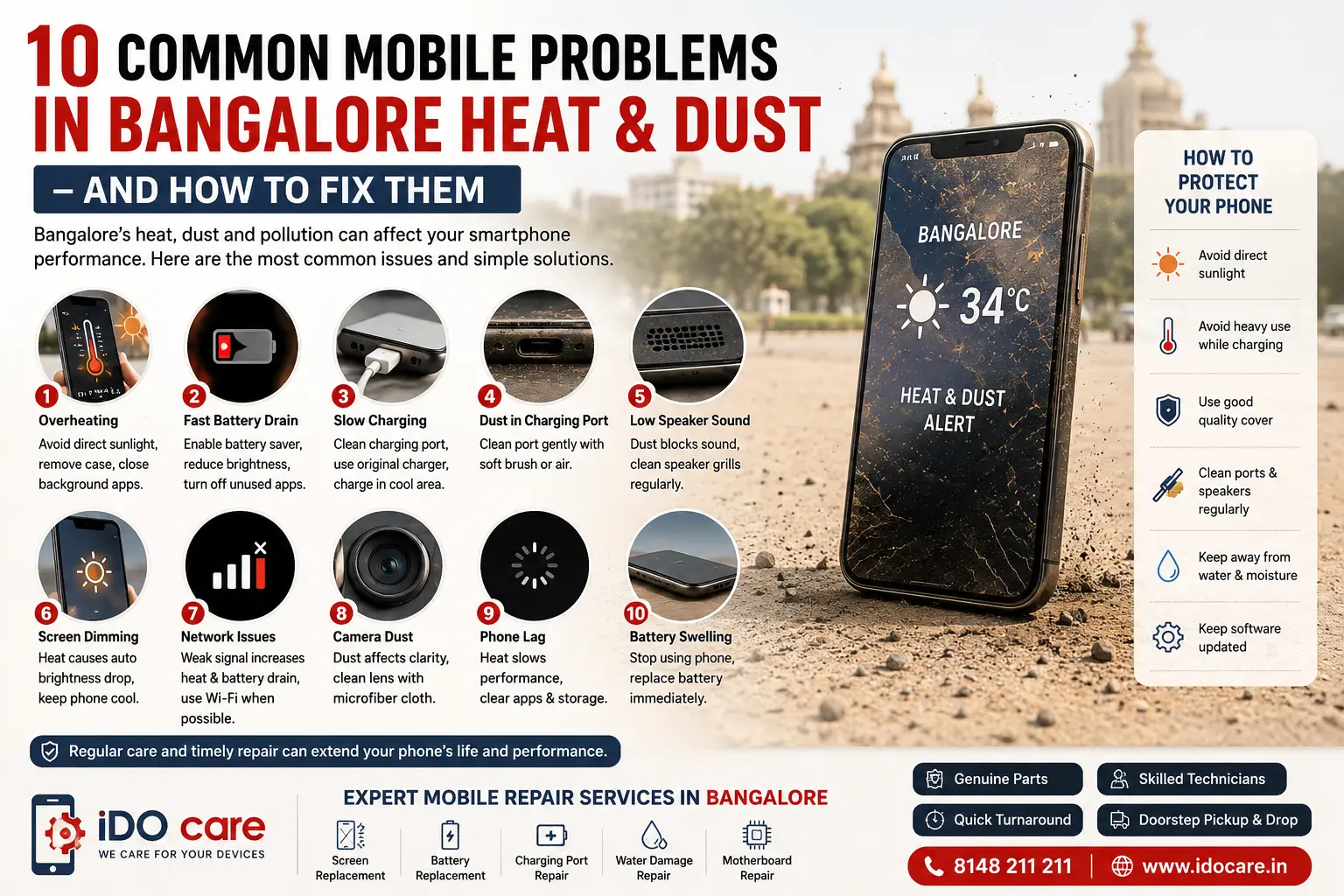
Here are the 10 most common mobile problems caused by Bangalore heat and dust — and how you can fix them.
1. Phone Overheating During Daily Use
One of the biggest problems in Bangalore summers is smartphone overheating. Heat builds up faster when using navigation, gaming apps, video calls, or fast charging outdoors. High temperatures can slow down performance and damage batteries over time.
How To Fix It
- Avoid direct sunlight exposure
- Remove thick phone cases while charging
- Close heavy background apps
- Avoid gaming while charging
- Use original chargers only
- Keep brightness lower outdoors
2. Fast Battery Drain
Heat causes lithium-ion batteries to degrade faster, which reduces battery backup and battery health. Many Bangalore users notice rapid battery drain during summer months.
How To Fix It
- Turn on battery saver mode
- Reduce screen brightness
- Disable unused Bluetooth/GPS
- Replace old batteries if battery health is low
- Avoid charging overnight daily
3. Slow Charging Problems
If your phone charges slowly in Bangalore heat, thermal protection may be limiting charging speed to prevent overheating.
How To Fix It
- Charge in a cool indoor area
- Remove the phone cover while charging
- Clean the charging port carefully
- Stop using the phone during charging
- Use certified fast chargers
4. Dust Blocking Charging Ports
Bangalore roads and construction dust easily collect inside charging ports. This causes loose charging connections, charging interruption, and accessory detection issues.
How To Fix It
- Clean the port gently with soft air or a brush
- Avoid metal pins or sharp objects
- Keep phones in pockets or closed bags
- Use dust protection plugs if needed
5. Speaker Sound Becoming Low
Dust accumulation inside speaker grills is extremely common in Bangalore traffic and outdoor usage.
How To Fix It
- Clean speaker grills using soft brushes
- Avoid keeping phones in dusty bike mounts
- Use protective cases with mesh cutouts
- Get professional cleaning for severe blockage
6. Display Heating & Screen Dimming
- Modern smartphones automatically reduce brightness when internal temperature rises. Users often notice dim displays while using maps or video outdoors.
- How To Fix It
- Move the device away from sunlight
- Reduce screen brightness manually
- Avoid long camera recording sessions outdoors
Allow the phone to cool before heavy use
7. Network & Signal Issues
- Weak mobile signals force phones to work harder, generating extra heat and battery drain. This often happens inside basements, tech parks, and traffic-heavy Bangalore areas.
- How To Fix It
- Switch between Wi-Fi and mobile data
- Use airplane mode temporarily in poor signal areas
- Restart the phone regularly
- Update carrier settings
8. Camera Fogging & Dust Inside Lens
- Dust and moisture exposure can affect camera clarity. Bike riders and outdoor users commonly face blurry photos due to dust entering camera modules.
- How To Fix It
- Use lens protectors
- Avoid exposing the phone during rain and dust storms
- Clean lenses with microfiber cloths
- Get internal cleaning if dust enters the camera module
9. Phone Lag & Slow Performance
- When phones heat up, processors reduce speed automatically to prevent damage. This is called thermal throttling.
- How To Fix It
- Delete unused apps
- Clear background apps
- Keep software updated
- Avoid heavy multitasking in heat
- Restart devices weekly
10. Battery Swelling & Hardware Damage
- Continuous overheating may eventually damage internal components and cause swollen batteries or motherboard issues.
- Warning Signs
- Back panel bulging
- Phone becoming unusually hot
- Random shutdowns
- Charging stopping automatically
- Quick Overview Table
|
Mobile Problem |
Common Cause in Bangalore |
Symptoms |
Quick Fix |
|
Phone Overheating |
High temperature & heavy usage |
Device gets hot, lagging |
Remove case, avoid sunlight |
|
Fast Battery Drain |
Heat affecting battery health |
Battery drops quickly |
Enable battery saver |
|
Slow Charging |
Thermal protection & dust |
Charging takes longer |
Clean port & cool device |
|
Charging Port Issues |
Dust accumulation |
Loose charging connection |
Professional port cleaning |
|
Low Speaker Sound |
Dust inside grills |
Muffled audio |
Clean speaker mesh |
|
Screen Dimming |
Heat protection system |
Brightness reduces automatically |
Move to cooler area |
|
Signal Problems |
Weak network zones |
Battery drain & poor signal |
Restart network settings |
|
Camera Dust/Fogging |
Outdoor exposure |
Blurry photos |
Clean lens carefully |
|
Phone Lagging |
Thermal throttling |
Slow performance |
Clear apps & storage |
|
Battery Swelling |
Excessive overheating |
Back panel bulging |
Replace battery immediately |
1. Why do smartphones overheat quickly in Bangalore weather?
Bangalore’s rising temperatures, traffic conditions, and outdoor usage can cause smartphones to heat up faster. Gaming, video calls, GPS navigation, and charging in hot environments increase device temperature. To prevent overheating, avoid direct sunlight, remove thick phone covers while charging, and close unnecessary background apps. If overheating continues, searching for “Mobile repair near me” can help diagnose internal hardware issues.
2. How does dust affect mobile phones in Bangalore?
Dust particles can enter charging ports, speakers, microphones, and camera modules, causing charging problems, low sound output, and blurry photos. Bangalore’s construction zones and traffic pollution make this issue very common. Regular cleaning and protective cases help reduce dust buildup. Professional cleaning services from IDO Care can help maintain phone performance safely.
3. Why is my phone battery draining faster during hot weather?
Heat affects lithium-ion batteries and reduces their efficiency over time. In Bangalore summers, users may notice faster battery drain, overheating, and sudden shutdowns. Lowering brightness, turning off unused apps, and avoiding heavy gaming can improve battery life. If the issue continues, a “Mobile repair near me” search may help you find battery replacement support nearby.
4. What causes slow charging problems in smartphones?
Slow charging usually happens due to dust inside the charging port, damaged cables, overheating, or low-quality chargers. Phones also reduce charging speed automatically when temperatures rise too high. Cleaning the charging port carefully and using original accessories can improve charging speed and battery health significantly.
5. Can Bangalore dust damage phone speakers?
Yes, dust can block speaker grills and reduce audio clarity over time. Many smartphone users in Bangalore experience muffled sound because of dust accumulation from outdoor travel and pollution. Cleaning the speaker mesh regularly and avoiding dusty environments can help. Professional cleaning from IDO care is recommended for severe dust blockage.
IDO care
At IDO Care, we specialize in professional smartphone, tablet, and laptop repair services with a focus on fast turnaround time, genuine-quality parts, and customer convenience. Our experienced technicians handle everything from minor software issues to advanced motherboard-level repairs for major brands including Apple, Samsung, OnePlus, Xiaomi, Vivo, Oppo, Realme, Google Pixel, iPad, and MacBook devices.
Our Core Expertise
|
Service Expertise |
What We Handle |
|
Screen Replacement |
Cracked display, touch issues, OLED/LCD replacement |
|
Battery Replacement |
Fast battery drain, swelling, overheating problems |
|
Charging Port Repair |
Loose charging, slow charging, connector damage |
|
Water Damage Repair |
Liquid damage cleaning and motherboard recovery |
|
Speaker & Mic Repair |
Low sound, distorted audio, microphone issues |
|
Camera Repair |
Blurry camera, focus issues, lens replacement |
|
Software Troubleshooting |
Hanging, lagging, boot loop, update problems |
|
Motherboard Repair |
Advanced chip-level diagnostics and repair |
|
MacBook Repair |
Keyboard, display, battery, motherboard issues |
|
iPad & Tablet Repair |
Screen, charging, battery, software services |
Why Customers Choose IDO care
- Experienced mobile repair technicians
- Quick diagnosis and same-day repairs for many issues
- Pickup and drop service available in Bangalore
- Support for premium smartphones and laptops
- Affordable pricing with quality repair solutions
- Advanced tools for precise hardware repair
Specialized Repair Support
We provide repair solutions for:
- Apple iPhone, iPad, MacBook
- Samsung Galaxy devices
- OnePlus smartphones
- Google Pixel devices
- Xiaomi / Redmi / Mi phones
- Vivo and Oppo devices
Bangalore Mobile Repair
Bangalore weather, dust, and heavy daily usage often lead to overheating, charging problems, battery issues, and speaker blockage. IDO care provides expert solutions designed specifically for common Bangalore mobile problems with doorstep support available in many areas.
Whether you are searching for “Mobile repair near me,” iPhone repair, Samsung screen replacement, or MacBook service in Bangalore, IDO care delivers reliable repair support with professional care.